Micro Deposit Verification, Explained
What Are Recurring Payments? Meaning, Types, Examples, and How They Work
Author:
Aaron Klein
A recurring payment is a repeated scheduled transaction after customer authorization. A merchant or payment processor charges a credit card, debit card, or bank account on a billing schedule. This guide explains recurring billing, automatic payments, subscription payments, and why same amount plus same date does not make every payment a subscription.
Contents
- Quick Answer: What Counts as a Recurring Payment?
- Recurring Payments vs Subscriptions
- How Recurring Payments Work
- Common Types of Recurring Payments
- Payment Methods for Recurring Payments in the US
- What Businesses Use Recurring Payments?
- Benefits of Recurring Payments
- Risks and Challenges of Recurring Payments
- How to Stop Automatic Payments from a Bank Account
- How Businesses Can Accept Recurring Payments
- Managing Failed Recurring Payments
- Security, Tokenization, and Authorization Rates
- Recurring Payments Across Markets: ACH, SEPA, Cards, and Local Rails
- Regulations and Consumer Rights to Mention Carefully
- Best Practices for Managing Recurring Payments
- The Future of Recurring Payments
Quick Answer: What Counts as a Recurring Payment?
A payment counts as a recurring payment when it repeats on an expected regular schedule after authorization, whether the frequency is weekly, biweekly, monthly, quarterly, or annually. The amount can stay fixed, as with an annual subscription, or change, as with a utility monthly bill. The label applies to consumer and business payments, so Netflix, Spotify, a gym membership, insurance, a mortgage, a loan payment, a SaaS plan, a recurring donation, and a utility charge all fit when the charge repeats. A subscription payment is one example. An automatic debit or recurring bill is another.
| Recurring payment? | Why | Example |
|---|---|---|
| ✔️ Yes | Repeating payment on an expected date | Netflix or Spotify |
| ✔️ Yes | Automatic debit from a bank account | Utility monthly payment |
| ✔️ Yes | Recurring obligation tied to a bill or debt | Mortgage, insurance, loan payment |
| ✔️ Yes | Repeated charge for access, service, or support | SaaS subscription, recurring donation |
Recurring Payments vs Subscriptions
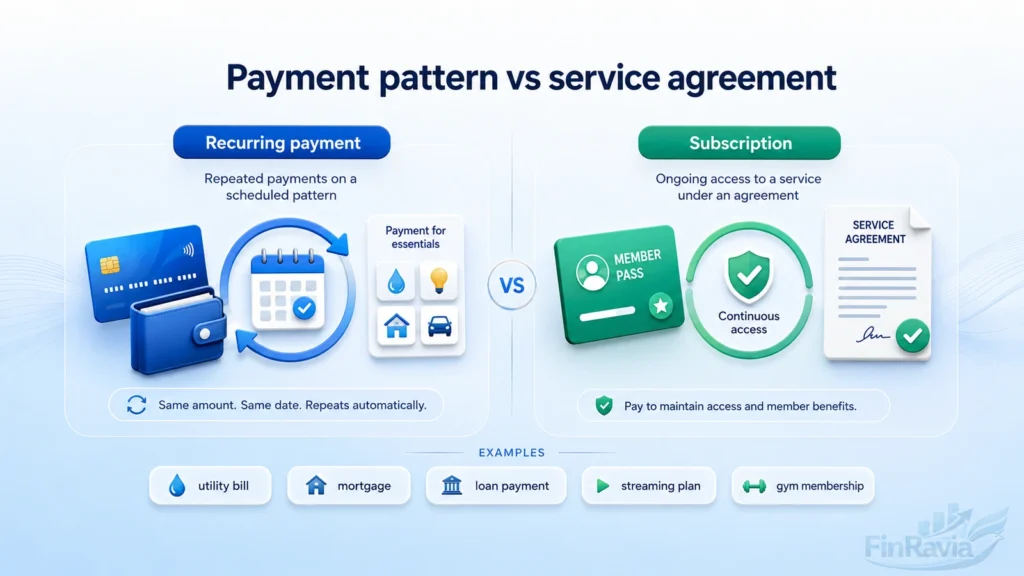
A recurring payment describes the payment pattern, while a subscription describes the agreement behind the product, service, content, or membership.
A subscription payment can run through a monthly payment, an annual charge, or a prepaid service where access continues after one upfront payment. A recurring bill is broader. It can include a mortgage, loan, insurance premium, utility bill, SaaS subscription, or gym membership.
The hidden mistake is simple. Same amount and same date do not prove a subscription agreement. In a budgeting app, that distinction matters because one category tracks a recurring expense, while the other tracks a recurring service relationship:
| Criterion | Recurring payment | Subscription | Example |
|---|---|---|---|
| What it describes | Repeated payment pattern | Service or access agreement | Utility bill vs Netflix |
| Amount | Fixed or variable | Fixed, tiered, or prepaid | Electric bill vs annual plan |
| Obligation | Can be debt, bill, or service | Tied to ongoing access | Mortgage vs Spotify |
| Budgeting use | Tracks money leaving account | Tracks optional service | Loan payment vs gym membership |
When a Recurring Payment Is Not a Subscription
A mortgage payment is a loan repayment with scheduled charges, not a subscription for access, content, or membership.
A loan payment repeats because a debt must be repaid. A utility bill repeats because electricity, water, gas, or phone service creates an essential bill. An insurance payment works differently because an insurance premium transfers financial risk to the insurer. Roommate transfers and business card monthly bill charges also create a recurring expense without a subscription agreement:
| Expense | Recurring payment? | Subscription? | Why |
|---|---|---|---|
| Mortgage | Yes | No | Debt repayment secured by a loan |
| Utility bill | Yes | No | Utility payment for essential service |
| Insurance | Yes | No | Premium transfers financial risk |
| Roommate transfer | Yes | No | Repeated household contribution |
| Business card charge | Yes | No | Repeated business expense |
When a Subscription May Not Have a Recurring Payment
A user can make one prepaid subscription payment while the subscription continues to deliver goods, service, or access across the full subscription term. This is the edge case that breaks the simple rule. A reader could pay once for a two-year plan and still receive recurring delivery every second month. The payment is a non-recurring subscription payment, but the service repeats. That creates ongoing access without a repeating charge.
⚠️ A subscription can repeat in service, not only in payment.
How Recurring Payments Work
The recurring payment process starts when a customer gives customer authorization and provides a credit card, debit card, bank account, or ACH details for charges on a fixed billing date.
The agreement sets the payment amount, product or service, billing frequency, and payment method. The merchant, payment gateway, or payment processor stores or tokenizes saved payment details, charges the customer account on schedule, transfers funds to the merchant account, and sends a payment confirmation to the customer or business.
The workflow works in 7 steps:
- Authorization
- Payment method capture
- Terms and billing frequency
- Secure storage or tokenization
- Scheduled charge
- Processing and settlement
- Confirmation and recordkeeping
What the Customer Authorizes
A customer authorizes the merchant once, and that recurring payment authorization covers future scheduled charges under the same billing agreement.
The consent connects the payment amount, billing frequency, payment method, service, and cancellation terms. This customer authorization gives the merchant permission to collect each charge without asking for new approval every cycle.
The authorization should identify:
- Amount
- Frequency
- Payment method
- Product or service
- Cancellation terms
Payment Processor, Gateway, and Merchant Account
A payment gateway captures payment details, while a payment processor routes the transaction through the bank and card network system.
In a card payment, the acquiring bank, card network, and issuing bank approve or decline the charge. In a bank account payment, the processor moves the debit through the relevant bank rail. After approval, payment processing ends with settlement into the merchant account.
A payment service provider may combine gateway access, recurring billing tools, security controls, collection, processing, and deposits in one setup.
Customer → Gateway → Processor → Card or Bank Network → Merchant Account
Common Types of Recurring Payments
Recurring payments are classified by amount logic, payment rail, and business use case. Amount logic separates fixed recurring payments, variable recurring payments, and usage-based payments. The rail shows whether money moves through cards, bank accounts, recurring invoices, installments, or saved payment methods. The use case explains the business reason behind the charge, from subscription payments to debt repayment:
| Classification basis | Types | Best user question |
|---|---|---|
| Amount logic | Fixed, variable, usage-based | Will the amount change? |
| Payment rail | Card, ACH, invoice, saved method | How does money move? |
| Business use case | Subscription, installment, donation, bill | Why does the charge repeat? |
Fixed Recurring Payments
Fixed recurring payments charge the same amount at regular intervals, so the customer sees a predictable payment each cycle. A gym membership with a monthly fee, a streaming plan, a SaaS subscription, or an annual fee uses fixed billing. This payment type fits access or service that stays the same during the billing period.
Variable Recurring Payments
Variable recurring payments repeat on schedule, but the amount changes with usage, dynamic pricing, or add-on charges.
A utility bill rises or falls with electricity, water, or gas consumption. A telecom bill combines a fixed base fee with variable billing for data overage, international calling, or extra texting.
A simple mini-example shows the mechanism:
Base fee + usage charge = variable recurring payment
Usage-Based Recurring Payments
A usage-based payment charges the customer based on consumption instead of access alone. A cloud provider bills for storage usage, processing power, or bandwidth usage. Higher consumption creates a higher invoice amount, so metered billing scales with demand. Usage-based billing differs from variable billing when no fixed component drives the charge.
⚠️ Variable billing can include a fixed base. Usage-based billing is tied directly to consumption.
Subscription-Based Recurring Payments
Subscription billing gives the customer ongoing access to a product, service, content library, or membership. A SaaS subscription charges monthly or annually for software access. A streaming subscription charges a recurring fee for digital content. A membership plan charges for continued participation or benefits.
| Category | What repeats | Example |
|---|---|---|
| SaaS | Software access | Project management plan |
| Streaming | Content access | Video or music service |
| Membership | Participation or benefits | Gym or professional group |
| Digital content | Access to files, tools, or media | Paid newsletter |
Installments and Payment Plans
An installment plan splits a total purchase into partial payments across a limited number of scheduled installments. The customer pays recurring charges until the purchase balance is repaid. That makes installments different from an open-ended subscription. Buy now pay later is one BNPL method for purchase financing — PayPal Pay in 4 is a common example — while a loan-based payment plan creates finite payments tied to a specific amount.
| Comparison | Subscription | Installment |
|---|---|---|
| Relationship | Ongoing access | Finite purchase repayment |
| End point | Ends when canceled or term ends | Ends after scheduled payments |
| Payment purpose | Service or membership access | Split purchase into partial payments |
Recurring Invoices
Recurring invoices collect payment repeatedly by creating scheduled invoice payment requests.
A business can automatically charge the customer, or it can automatically send invoice pages for payment. This structure works when the invoice needs line items, one-time charges, recurring products, taxes, or future payment records.
| Method | What happens | Best fit |
|---|---|---|
| Automatically charge | Customer payment method is charged | Stable billing relationship |
| Automatically send invoice | Customer receives invoice for payment | Itemized or approval-based billing |
Charges on Saved Payment Methods / Card-on-File
A business saves the payment method during the initial flow, then uses it for future charges. Saved payment methods support card-on-file transactions, future recurring usage, and merchant-initiated transactions where the customer is not present at checkout. A PaymentIntents-style flow captures saved payment details, creates a payment token, and lets the business charge later under the agreed terms.
Payment Methods for Recurring Payments in the US
Recurring card payments use credit card and debit card rails, while ACH payments move money through the US bank-to-bank transfer system. The payment rail affects fees, timing, payment failure patterns, and user control. A direct debit pulls funds from a bank account after authorization. A recurring card payment depends on the card network and saved card details. For you, the visible charge can look similar. Behind the scenes, the route is different:
| Payment method | Source of funds | Common use | Main risk | US relevance |
|---|---|---|---|---|
| Recurring card payment | Credit card or debit card | Subscriptions, memberships, apps | Card expiry or declined card | Very common |
| ACH debit | Bank account | Loans, bills, utilities, services | Insufficient funds or revoked authorization | Core US bank rail |
| Direct debit | Bank account | Automatic bill payment | User misses account activity | Used as bank-debit concept |
| Recurring invoice | Card or bank account | Business billing | Late payment | Common in B2B |
Recurring Card Payments
A customer provides card details, and the merchant or processor charges the credit card or debit card on schedule.
This recurring card payment runs through card rails. The card network, issuer, and processor decide whether the charge is approved or declined. A saved card creates convenience, but card expiry and card replacement create payment failure risk.
⚠️ Card details can change. That turns a working subscription into a missed payment or involuntary churn, the same card limits and decline patterns that affect other online card payments.
ACH and Bank Account Payments
ACH supports electronic bank-to-bank payment in the US, and ACH recurring payments let a company debit a bank account after authorization.
This is the bank-account version of an automatic debit. The customer gives permission, the company initiates the account debit, and the bank rail moves the money. Because the charge comes from cash in the account, you need to monitor timing, balance, and authorization status.
US note: ACH is the core US bank-to-bank payment rail for recurring debit from a bank account.
Direct Debit, Standing Order, and Recurring Card Payment Are Not the Same Thing
Direct debit is a payment mechanism, recurring card payment is a card-based mechanism, and standing order is a bank instruction that sends money on a schedule. Those terms describe how money moves. They do not define whether the charge is a subscription, loan payment, utility bill, insurance premium, or another payment category. Casual language blurs the difference, but a payment rail is not the same as the expense itself.
⚠️ Payment method is not the same as expense category.
What Businesses Use Recurring Payments?
You see one line on a statement. A business sees a system that keeps access open, bills usage, collects a donation, or turns a customer relationship into predictable revenue. That is why businesses use recurring payments across SaaS, streaming, utilities, memberships, nonprofits, publications, online education, and subscription business models.
The recurring charge is not the business model by itself. It is the payment machinery behind the model:
| Industry | Example | Why recurring payments fit | Payment type |
|---|---|---|---|
| SaaS | Dropbox, Salesforce, Shopify | Software access stays active | Subscription billing |
| Streaming | Netflix, Hulu, Spotify | Content access renews | Subscription payments |
| Memberships | Gym memberships | Access continues by cycle | Fixed recurring payment |
| Utilities | Electric, water, gas | Usage creates repeated bills | Variable recurring bill |
| Nonprofits | Donation programs | Support continues over time | Recurring donation |
SaaS, Streaming, and Digital Services
A SaaS subscription sells continuing access, not a single download. The customer pays for software that stays available after the first checkout, and the company uses recurring revenue to keep the account active.
Streaming subscriptions follow the same engine with a different product. Netflix, Hulu, and Spotify charge for digital services because the user keeps monthly access to streaming content.
Utilities, Telecom, Insurance, Loans, and Mortgages
Here is where consumer finance gets messy. A recurring bill can look like a subscription on a bank statement, yet it carries a different financial meaning.
Utility bills repeat because electricity, water, gas, or telecom service continues. Insurance payment repeats because an insurance premium transfers risk. A loan payment or mortgage payment repeats because debt repayment remains unfinished — the same repayment behavior machine learning credit scoring models are trained to predict before approval. These charges are recurring expenses, not automatic proof of subscription access.
| Payment | Recurring bill? | Subscription? | Main reason |
|---|---|---|---|
| Utility bills | ✔️ Yes | ❌ No | Essential service billing |
| Telecom bills | ✔️ Yes | ⚖️ Mixed | Base service plus usage |
| Insurance | ✔️ Yes | ❌ No | Risk transfer |
| Loan payment | ✔️ Yes | ❌ No | Debt repayment |
| Mortgage payment | ✔️ Yes | ❌ No | Secured debt repayment |
Nonprofits and Recurring Donations
A recurring donation turns a supporter’s one decision into 12 scheduled contributions in a year. The nonprofit does not sell access. It receives continuing support.
The donation flow is simple:
- The supporter chooses a donation amount
- The nonprofit collects authorization
- The payment repeats on schedule
- Each contribution updates the donation record
Benefits of Recurring Payments
The benefits of recurring payments come from one shift. A business stops rebuilding the same transaction every cycle and starts managing a payment relationship.
That shift supports predictable cash flow, cleaner revenue forecasting, faster payment processing, customer convenience, and lower renewal friction. It does not guarantee reliable cash flow. Recurring revenue stays useful when churn, failed payments, cancellations, and billing errors are managed with discipline:
| Benefit | For customer | For business | Limitation |
|---|---|---|---|
| Predictable payments | Fewer surprise steps | Better revenue visibility | Failed payments still break flow |
| Billing automation | Less repeated work | Less manual invoicing | Errors need monitoring |
| Customer convenience | No repeated checkout | Stronger payment experience | Cancellation must stay clear |
| Flexible billing | Easier plan fit | Better customer retention | Churn still needs tracking |
Predictable Cash Flow and Forecasting
A recurring charge turns one customer decision into a repeating cash inflow, and that gives the business more revenue visibility.
This is where recurring revenue becomes useful for financial forecasting. A subscription, membership, or scheduled service payment gives finance teams a clearer view of revenue streams before the money arrives. That visibility supports budgeting, investments, payroll planning, and operating decisions.
Recurring charges create repeated cash inflow, and that gives a business a clearer base for budget planning.
Customer Convenience and Fewer Manual Steps
The customer benefit is plain. The payment happens without forcing the customer back through the checkout process every billing cycle.
Automatic payments remove repeated card entry, reduce payment reminder friction, and keep access or service active after authorization. The payment experience improves because the user does not have to rebuild the same transaction each month.
💳 Customer benefit
One authorization replaces repeated checkout steps.
Reduced Manual Billing Work
Manual billing is expensive because people chase invoices, correct avoidable mistakes, and spend time on payment collection instead of operations.
Automated invoicing and recurring payment processing move that work into the billing system. A payment gateway then processes the transaction, while invoice automation lowers admin workload and reduces billing errors:
| Manual task | Automated replacement | Risk reduced |
|---|---|---|
| Create invoices by hand | Automated invoicing | Missed invoice |
| Chase payment collection | Scheduled charge | Late payment |
| Re-enter payment records | Billing automation | Data entry error |
| Track payment status manually | Gateway reporting | Slow follow-up |
Retention, Churn, Upsell, and Customer Lifetime Value
Recurring billing reduces renewal forgetfulness because the customer does not have to make a new payment decision at every cycle.
That matters for customer retention. Flexible billing can match monthly, quarterly, or annual preferences, while a strong customer relationship creates space for upsell, cross-sell, add-ons, and upgrades. The same system that collects the subscription renewal can support customer lifetime value:
| Retention driver | Payment mechanism | Caveat |
|---|---|---|
| Fewer missed renewals | Scheduled billing | Failed payments still create churn |
| Better plan fit | Flexible billing | Too many plans create confusion |
| Add-ons and upgrades | Existing payment relationship | Customer value must be clear |
| Lower friction | Stored payment method | Cancellation must remain transparent |
Risks and Challenges of Recurring Payments
Recurring payment risks start when a business treats automation as a substitute for control. The same system that creates smooth billing can also multiply failed payments, expired payment methods, billing errors, late cancellations, security gaps, and compliance risk.
For the customer, the damage appears as a duplicate charge, an unwanted charge, or a service interruption. For the business, it becomes payment failure, lost revenue, fraud risk, and weaker customer trust:
| Risk | Cause | Impact | Mitigation | Source needed |
|---|---|---|---|---|
| Failed payment | Expired card or outdated bank details | Missed revenue | Update flow and payment retries | Payment processor data |
| Billing error | Incorrect amount or duplicate charge | Customer trust loss | Billing audit | Internal billing logs |
| Cancellation delay | Billing system not updated | Unwanted charge | Cancellation confirmation | Cancellation policy |
| Security failure | Weak payment data controls | Fraud or data exposure | Encryption and access controls | PCI DSS source |
| Compliance risk | Poor stored credential handling | Regulatory and card-network issues | Documented authorization | Legal or network rules |
Failed Payments and Expired Payment Methods
A card does not need to be stolen to break a recurring payment. Card expiry, card replacement, or outdated banking details can turn a valid customer relationship into a failed charge.
That failure has two costs. The customer misses access, a bill, or a payment record. The business loses cash it already expected. Strong payment retries work with reminders and update links, not blind repeated attempts.
The control flow should leave five signals:
- 💳 Detect expiry or outdated bank details
- 📩 Notify the customer
- 🔄 Update the payment method
- ✅ Retry the charge
- 🧾 Confirm the result
Cancellations and Unwanted Charges
The most damaging cancellation problem is not the cancellation itself. It is the lag between customer cancellation and billing system update.
When a canceled subscription remains active in the billing system, the next charge becomes an unwanted charge. That creates a customer dispute and makes revenue tracking less reliable. Clean cancellation handling protects both sides.
Cancellation handling should leave four records:
- 🛑 Cancel request
- ⚙️ Billing update
- 🚫 Stopped future charge
- 📩 Confirmation to the customer
Billing Errors, Duplicate Charges, and Incorrect Amounts
Billing errors turn automation into a trust problem. An incorrect billing amount tells the customer the system cannot price the account correctly. A duplicate charge tells the customer the system cannot count correctly.
Routine billing audit is the counterweight. Automated billing tools reduce human error, but they still need checks for pricing rules, duplicate charges, cancellation status, and failed-payment logs.
Audit checklist:
- 🧮 Amount accuracy
- 🧾 Duplicate charge detection
- 🔄 Cancellation sync
- 📄 Invoice status
- ⚠️ Failed-payment log review
Security, Compliance, and Stored Payment Data
Stored payment credentials make recurring billing efficient, but they also create a concentrated security target. A saved card, tokenized data, or bank debit authorization must be protected because one weak control can expose many future charges.
PCI DSS sets safeguards for card data. Encryption and tokenization reduce unauthorized access risk by limiting exposure of sensitive payment information. Access controls decide who inside the system can view, change, or trigger payment data.
| Control | What it protects | Why it matters | Source needed |
|---|---|---|---|
| PCI DSS | Card data environment | Sets card security safeguards | PCI DSS official standard |
| Encryption | Sensitive payment information | Makes exposed data unreadable | Security policy |
| Tokenization | Stored payment credentials | Limits raw card data exposure | Processor documentation |
| Access controls | User permissions | Reduces unauthorized access | Internal control policy |
Fraud Risks in Recurring Billing
Recurring payment fraud often starts after the checkout moment. The fraudster does not need to rebuild payment details when the account already contains saved credentials.
Account takeover uses stolen login access to spend against a saved payment method, the same failure point identity verification for bank accounts, credit cards and loans is designed to catch before an account opens — often through a selfie ID verification step at signup. Authorization abuse tests card validity through low-value or repeated attempts. The customer dispute becomes the moment the hidden fraud becomes visible.
| Fraud type | How it works | Detection signal | Mitigation |
|---|---|---|---|
| Account takeover | Fraudster enters account with stolen credentials | Unusual login or charge pattern | Strong login controls and monitoring |
| Authorization abuse | Stored credentials are used for card testing | Low-value attempts or repeated declines | Velocity checks and fraud rules |
| Disputed recurring charge | Customer rejects an unauthorized charge | Chargeback or complaint | Clear authorization records |
How to Stop Automatic Payments from a Bank Account
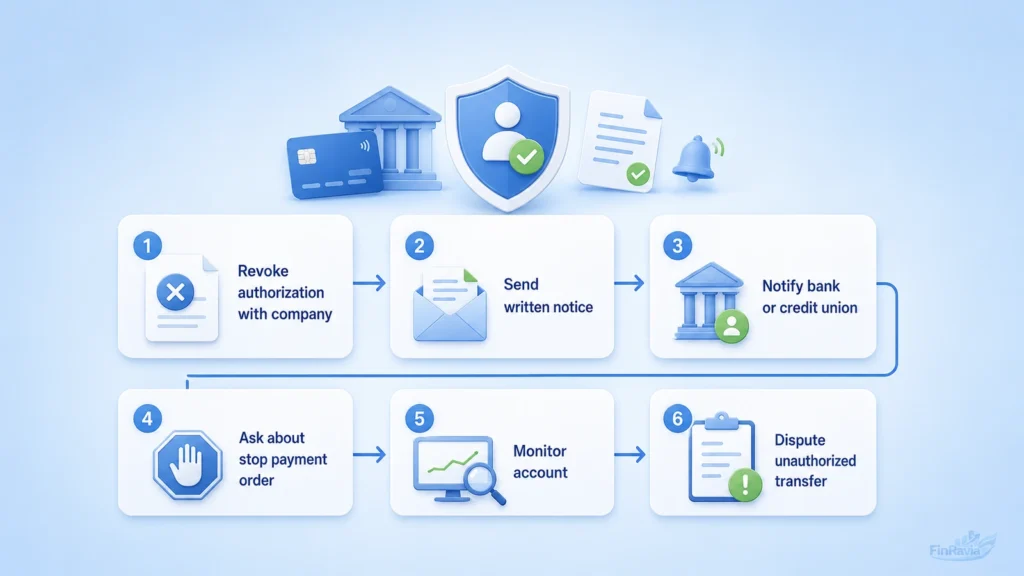
Stopping automatic payments from a bank account is not a button inside the payment system. It is a withdrawal of permission from the company and a notice to the bank or credit union that future account debits are no longer authorized.
That distinction matters. You can revoke authorization for automatic debits, but stopping the payment does not erase the bill, loan, subscription, or contract behind it. The payment rail can stop while the obligation remains.
You can revoke authorization, but may still owe the underlying bill, loan, or contract.
Step 1: Call and Write the Company
Start with the company because it is the party taking money from the account. Tell customer support that you revoke authorization for automatic payments from your bank account.
Your written notice should make the purpose unmistakable. Say whether you want to cancel a subscription or contract, or only change the payment method. A phone call moves the issue faster, but the written notice creates proof.
Keep these records:
- Phone date
- Representative name
- Email or letter copy
- Cancellation confirmation
Step 2: Call and Write Your Bank or Credit Union
The bank or credit union needs its own notice because the company and the financial institution play different roles.
Tell the bank that the company’s payment permission has been revoked. If a later automatic debit still hits the account, that charge can become a payment error and support a refund request.
| Notice | Who receives it | What it says | Why it matters |
|---|---|---|---|
| Company notice | Merchant or biller | Permission is revoked | Stops the source request |
| Bank notice | Bank or credit union | Authorization is no longer valid | Blocks or disputes future debit |
Step 3: Ask About a Stop Payment Order
A stop payment order is the bank-side instruction. It tells the bank or credit union not to pay a specified company from your account.
This is separate from revoking authorization with the company. Banks can charge fees for stop payment orders, and the request must identify the company and payment clearly. Keep dates, confirmation numbers, and copies of every request.
Warning box
Stop payment orders may have fees and do not cancel the underlying obligation.
Step 4: Monitor Your Account and Dispute Unauthorized Transfers
After you revoke permission, account monitoring becomes evidence. Look for any unauthorized transfer, automatic debit, or payment that posts after the authorization was withdrawn.
Federal law gives consumers dispute rights for unauthorized transfers, and timing matters. Notify the bank promptly so the dispute stays inside the rule window and the bank can investigate the account debit.
➡️ The clock starts with the statement. Under Regulation E, the key deadline is 60 days after the bank sends the statement that first shows the unauthorized electronic transfer.
Stopping Automatic Payments Does Not Cancel What You Owe
Canceling automatic payment stops the payment method. It does not cancel debt, loan repayment, service contract, subscription, or another valid payment obligation.
A lender can still expect loan payment through another payment method. A service company can still require separate contract cancellation. The safe move is to stop the debit and settle the underlying obligation through a documented alternative payment method.
How Businesses Can Accept Recurring Payments
Accepting recurring payments is not just adding a checkout button. A business needs billing logic to decide what to charge and payment processing to move money from the customer to the merchant account.
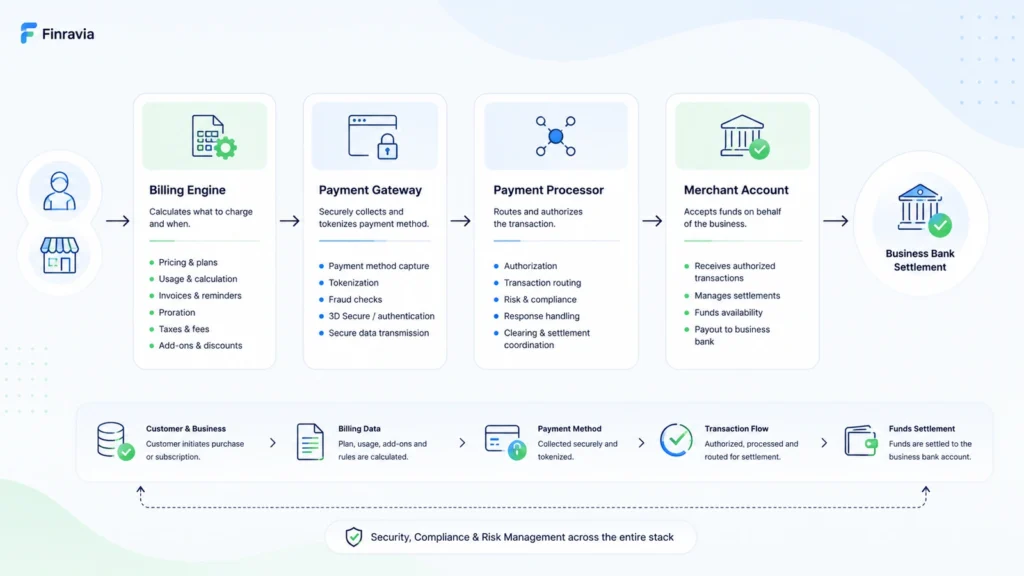
The billing engine handles pricing strategy, invoice proration, discounts, add-ons, recurring billing rules, and scalable billing when pricing experiments grow. The payment gateway and payment processor handle the money movement. Their features differ by payment methods, currencies, settlement time, fraud controls, and custom checkout control:
| Component | What it does | Why it matters | Question to ask |
|---|---|---|---|
| Billing engine | Calculates prices, invoices, proration, discounts | Keeps billing accurate as plans change | Can it support plan changes and add-ons? |
| Payment gateway | Captures payment details and connects checkout | Shapes checkout flow and payment method support | Does it support the payment methods customers use? |
| Payment processor | Routes and settles the transaction | Moves money into the merchant account | What are the settlement timing and failure rules? |
Billing Engine vs Payment Processor
The billing engine decides what the customer owes. The payment processor moves the money.
That split becomes important as the business grows. A recurring billing system needs pricing logic, invoice generation, proration, discounts, taxes, upgrades, downgrades, and billing automation. The payment gateway connects the customer payment method to the transaction flow, while the processor handles payment settlement into the merchant account.
Payment path:
- Billing engine
- Payment gateway
- Payment processor
- Merchant account
Choosing a Processing Model
The processing model is the rulebook behind future charges. It tells the system whether the charge is fixed, customer-triggered, or merchant-triggered after the first setup.
A subscription model fits a fixed amount and fixed schedule. Card-on-file uses saved credentials at checkout and works when the customer returns to buy again. Unscheduled card-on-file fits merchant-initiated transactions, usage-based billing, top-ups, and future charges with no fixed amount or date:
| Model | Initiator | Schedule | Amount | Use case | Risk |
|---|---|---|---|---|---|
| Subscription | Merchant | Fixed | Fixed | SaaS or membership billing | Failed renewal |
| Card-on-file | Customer | Customer action | Purchase-based | Repeat checkout | Saved credential misuse |
| Unscheduled card-on-file | Merchant | No fixed schedule | Variable | Usage-based billing | Weak authorization setup |
Initial Authorization, Mandates, and Tokens
The first transaction does more than collect money. It establishes the recurring relationship that future charges depend on.
Initial authorization creates the mandate, confirms the customer’s consent, and can produce the token used for later merchant-initiated transactions. A zero-auth request still needs the same discipline because incorrect setup can create billing-cycle problems before the first paid renewal arrives.
Authorization checklist:
- Customer consent
- Mandate creation
- Token creation
- Future charge setup
- Billing cycle test
Checkout Layer vs Server-Side Billing Layer
Checkout is the visible part. Server-side billing is the machinery that keeps the recurring relationship alive after the customer leaves the page.
Checkout captures card details, authentication, and tokenization. The server-side layer runs retries, mandate management, renewals, and merchant-initiated charges. If those layers do not communicate, payment failure hides inside the system until it shows up as churn.
Architecture view:
- Checkout captures card and authentication
- Tokenization stores payment credentials safely
- Server-side billing runs renewals and retries
- Mandate management supports future merchant-initiated charges
Managing Failed Recurring Payments
Failed recurring payments are not just declined transactions. They are a revenue leak that starts in the payment system and ends as involuntary churn when the customer did not choose to leave.
Recovery depends less on force and more on timing. Blind batch retries can raise the decline rate, add transaction fees, and train the system to repeat the same failed charge. Smart retry logic uses the failure reason, customer notification, and better retry timing to support payment recovery:
| Retry strategy | What it does | Risk | Better use |
|---|---|---|---|
| Immediate repeat retry | Charges again right away | Same decline repeats | Use only for temporary processor errors |
| Batch retries | Retries many failed charges together | Higher fees and weak timing | Replace with reason-based retry logic |
| Customer notification | Asks customer to update details | Delay before recovery | Use for expired cards or outdated details |
| Smart retry logic | Times retry by failure signal | Needs clean payment data | Use for revenue recovery |
Update Expired or Replaced Cards
A card can expire or be replaced while the customer still wants the service. That is the quiet failure point behind many missed renewals.
When the token on file no longer maps to a valid account, the next charge fails even though the customer relationship still exists. An account updater checks updated card details, repairs token mapping, and reduces failed charges caused by card expiry or card replacement:
| Problem | Mechanism | Data needed | Limitation |
|---|---|---|---|
| Expired card | Account updater checks newer card details | Card network update | Not every card update is available |
| Replaced card | Token mapping is refreshed | Updated account data | Issuer support can vary |
| Invalid token on file | Payment credential is corrected | Valid account match | Does not fix insufficient funds |
Retry Failed Payments Without Over-Retrying
A failed payment can still be recoverable. The mistake is treating every failed charge as the same failure.
Retry timing should respond to the reason behind the decline. Over-retrying at arbitrary intervals can increase decline rate and transaction fees. A stronger process combines smart retry, customer notification, payment update links, and dunning process controls.
| Retry method | Risk | Better alternative | Metric |
|---|---|---|---|
| Arbitrary batch retry | More declines and fees | Reason-based retry timing | Recovery rate |
| Same-day repeated retry | Customer frustration | Wait for updated signal | Decline rate |
| Manual dunning only | Slow recovery | Automated notice plus retry | Days to recovery |
Security, Tokenization, and Authorization Rates
A stored card looks simple to the customer, but it creates a security problem and an authorization problem at the same time. Raw stored credentials increase exposure. Weak credential handling raises fraud risk. Outdated card details can lower authorization rates when a renewal charge reaches the network.
Tokenization changes that design. A card token replaces sensitive payment data, while network tokenization can keep the payment credential useful when underlying card details change. That improves payment security and can support authorization uplift because the renewal reaches the card network with a stronger, more current credential.
Stored credentials still need fraud controls. Tokenization reduces raw data exposure, but it does not replace monitoring for account takeover, unusual charge patterns, or abusive testing.
| Stored card detail | Token | Network token | Effect |
|---|---|---|---|
| Raw card number creates exposure | Replaces sensitive data | Maintained through network token lifecycle | Reduces data exposure |
| Card expiry breaks future charge | Local token can still fail | Network token can remain valid after card change | Supports authorization rates |
| Saved card can be misused | Token limits raw credential access | Network credential still needs monitoring | Requires fraud controls |
Recurring Payments Across Markets: ACH, SEPA, Cards, and Local Rails
Recurring payments across markets fail when a company treats every country as if it used the same payment rail. The US market relies heavily on ACH for bank-to-bank transfer, while European markets use SEPA, card schemes, and local rules in a different compliance environment.
For Finravia US, ACH stays the primary bank-payment reference. SEPA, PSD2, SCA, and VRP belong in international context because they explain why a recurring setup that works in one market can fail in another. Market differences change issuer behavior, payment failure patterns, settlement timing, and compliance requirements.
| Rail | Region | Use case | Main limitation |
|---|---|---|---|
| ACH | United States | Bank account recurring debit | US-focused payment rail |
| Card schemes | US and global markets | Card-based recurring billing | Card expiry, declines, issuer behavior |
| SEPA | Europe | Euro-area bank payments | Europe-specific rules and mandates |
| Local payment methods | Country-specific | Regional payment access | Setup changes by market |
Regulations and Consumer Rights to Mention Carefully
Consumer rights around automatic payments are the US anchor here. A consumer can revoke automatic debit authorization, and federal law gives dispute rights for unauthorized transfers, including a key 60-day window after the bank sends the statement showing the disputed electronic transfer.
SCA, PSD2, and VRP belong in international context. PSD2 and SCA affect European recurring payments through authentication and consent structure. VRP affects variable recurring payments in the UK. For a Finravia US page, those rules should support comparison without taking attention away from bank authorization, payment dispute rights, and federal protection.
⚖️ US consumer-rights statements need official US sources. SCA, PSD2, and VRP should not become the main regulatory frame on this page.
Best Practices for Managing Recurring Payments
Recurring payment best practices start with a simple rule. Do not automate a broken billing process.
A business should automate invoicing only after billing cycles, pricing rules, payment terms, and cancellation rules are clear. Payment gateways need the same discipline. The gateway should support the required payment methods, retry controls, payment analytics, failed transaction detection, and revenue recovery reporting.
Security sits underneath the whole system. PCI DSS, encryption, tokenization, and access controls protect payment data, while flexible billing cycles reduce unnecessary payment friction for customers.
Use this checklist before scaling recurring billing:
- Automate invoicing after pricing rules are stable
- Evaluate payment gateways by methods, retries, reporting, and settlement
- Protect stored payment data with PCI DSS, encryption, and tokenization
- Offer billing cycles that match customer payment behavior
- Monitor failed transactions, recovery rate, churn, and payment analytics
Automate Invoicing and Billing Operations
Automated invoicing gives the billing cycle a memory. The system applies the pricing rule, collects subscription fees or usage-based fees, sends the invoice, records the payment status, and reduces the small errors that appear when people rebuild the same bill by hand.
That matters for operational cash flow. Late payments become easier to detect, fee collection becomes more consistent, and billing stability improves as the customer base grows.
The operating sequence is simple:
- Set billing rules
- Calculate fees
- Send invoice
- Collect payment
- Record status
Choose Reliable Payment Gateways
A payment gateway is not only a checkout tool. It shapes how money enters the business, which payment methods customers can use, which currencies are supported, how fast transaction processing runs, and how payment failures are handled.
The gateway should fit the billing logic before the business scales. A weak fit creates checkout friction, settlement delays, and failure patterns that look like customer churn but start inside the payment stack.
| Gateway factor | What to check | Why it matters |
|---|---|---|
| Payment methods | Cards, ACH, local methods | Matches customer payment behavior |
| Currencies | Single or multi-currency support | Supports market expansion |
| Processing speed | Real-time processing and reporting | Improves payment visibility |
| Failure handling | Decline data and retry tools | Supports payment failure reduction |
Offer Flexible Billing Cycles
Flexible billing cycles let the payment cycle match the customer’s preference and the business model. Monthly plans lower the entry barrier. Quarterly plans reduce repeat billing touchpoints. Annual plans improve upfront cash visibility.
The point is not to offer every possible subscription term. The point is to remove payment friction without damaging cash-flow planning.
| Cycle | Customer fit | Business fit | Cash-flow effect |
|---|---|---|---|
| Monthly | Lower upfront cost | Easier acquisition | Smaller recurring inflow |
| Quarterly | Fewer payment events | More stable cycle | Medium cash visibility |
| Annual | Long-term commitment | Stronger retention signal | Larger upfront inflow |
Use Payment Analytics and Monitoring
Payment analytics turns recurring billing from a black box into an operating dashboard. The system monitors recurring payments, detects failed transactions, triggers customer notification, runs automated retries, and shows whether payment recovery is working.
That visibility is risk mitigation. Without payment monitoring, a business learns about failed charges only after revenue recovery becomes harder or involuntary churn appears in the subscription data.
The recovery workflow should stay visible:
- Monitor recurring payments
- Detect failed transaction
- Notify customer
- Update payment method
- Run retry automation
- Recover payment or mark unresolved
The Future of Recurring Payments
Automation is shaping recurring payments by moving billing from fixed calendars to systems that read payment signals, adjust recovery timing, and speed up reconciliation.
AI-powered billing already appears in narrow tasks such as smart retry timing and predictive payment analytics. Real-time payments reduce processing delays when the payment rail supports instant settlement. Payment customization will matter more as businesses match schedules, amounts, and reminders to customer behavior without losing control of consent. The financial value is not magic. Early issue resolution helps churn prevention when the system detects failure risk before the customer loses access.
| Trend | What changes | Value | Source needed |
|---|---|---|---|
| AI-powered billing | Retry timing and payment recovery become signal-driven | Better recovery decisions | Payment processor documentation |
| Real-time payments | Processing and settlement move faster | Faster reconciliation | Federal Reserve or RTP source |
| Predictive analytics | Failure risk appears earlier | Churn prevention | Billing platform evidence |
| Payment customization | Schedules and reminders fit customer behavior | Lower payment friction | Product or processor source |
- CFPB — how to stop automatic payments from a bank account
- CFPB — revoking ACH authorization for electronic debits
- CFPB — Regulation E § 1005.10 Preauthorized transfers
- CFPB — Regulation E § 1005.11 Procedures for resolving errors
- eCFR — 12 CFR § 1005.10 Preauthorized transfers
- eCFR — 12 CFR § 1005.11 Error resolution procedures
- CFPB — sample letter to revoke company authorization
- Nacha — ACH Payments Fact Sheet
- Nacha — Account Validation Resource Center
- Nacha — Supplementing Fraud Detection Standards for WEB Debits
- Nacha — WEB Proof of Authorization Industry Practices
- PCI Security Standards Council — Document Library
- PCI Security Standards Council — Tokenization Product Security Guidelines
- Visa — Token Management Service and network tokenization
- Stripe — recurring payments vs subscription billing
- Stripe — payment tokenization 101
- Stripe — payment retries and failed-payment recovery
- Stripe Docs — Smart Retries for revenue recovery
- Stripe — expired cards for recurring payments
- Federal Reserve Financial Services — FedNow Service
- Federal Reserve Financial Services — FedNow participants and service providers
- The Clearing House — RTP real-time payments network
- European Payments Council — SEPA Direct Debit
- European Central Bank — Single Euro Payments Area
- European Banking Authority — SCA applicability for recurring transactions
- Open Banking UK — Variable Recurring Payments
Frequently asked questions
Is autopay the same as a recurring payment?
Autopay is a recurring payment when a company or service provider automatically charges an approved payment method on a schedule. Bank bill pay is different because you authorize the bank or credit union to send the payment, not the company to pull it.
What permission does a company need before taking automatic payments?
A company needs payment authorization before taking automatic payments from a card, bank account, or saved payment method. That authorization should connect the customer, company, payment method, billing schedule, and charge terms.
Can a recurring payment amount change?
A recurring payment amount can change when the billing model is variable. Utilities, usage-based software, telecom plans, add-ons, overages, and dynamic pricing can produce a different charge in each billing cycle.
Does stopping automatic payments cancel a loan, subscription, or contract?
Stopping automatic payments cancels the payment method, not the underlying obligation. You can still owe a valid loan payment, contract charge, subscription fee, service bill, or installment balance through another payment method.
Can a bank or credit union stop future automatic debits?
A bank or credit union can receive notice that authorization has been revoked and can also process a stop payment order for a specified automatic debit. The request should identify the company, payment, account, and timing clearly.
What records should you keep after revoking authorization?
You should keep the call date, representative name, written company notice, bank or credit union notice, email copy, confirmation number, and account statements showing whether later debits stopped or continued.
Why do recurring card payments fail?
Recurring card payments fail when the issuer declines the charge, the card expires, the card is replaced, the customer lacks funds, fraud controls block the transaction, or retry logic repeats the wrong recovery action.
Why can a recurring payment continue after a card is replaced?
A recurring payment can continue after card replacement when card-network tools, account updater services, or network tokenization connect the saved credential to updated card details. That can reduce failed renewals, but it also makes cancellation handling more important.
What payment method works best for recurring payments in the US?
ACH works well for US bank-account recurring debits, especially bills, loans, utilities, B2B payments, and larger predictable charges. Cards work better when checkout speed, customer familiarity, and instant authorization matter more than bank-rail settlement.
Are recurring payments safe when card details are stored?
Recurring payments are safer when the business uses clear authorization, tokenization, encryption, PCI DSS controls, fraud monitoring, access controls, and transparent cancellation handling. The customer should also monitor statements for duplicate, incorrect, or unauthorized charges.