Micro Deposit Verification, Explained
PayPal Pay in 4 Not Showing Up: Why It’s Missing, Disappeared or Not Working
Author:
Aaron Klein
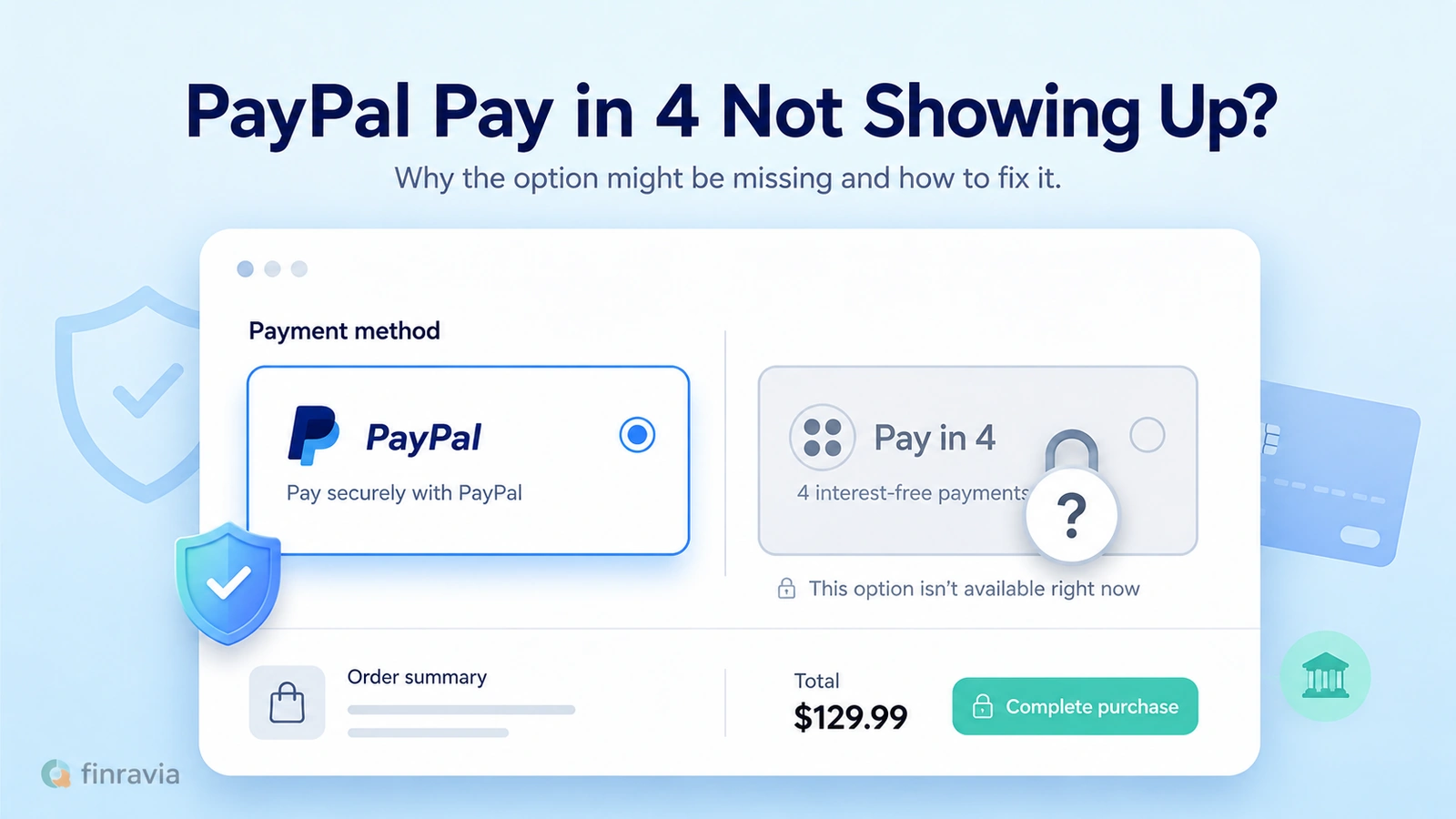
PayPal Pay in 4 splits an eligible $30–$1,500 purchase into 4 payments, and the option only appears when the merchant, the cart, the account and PayPal's approval all qualify at once. A missing, disappeared or declined Pay in 4 traces back to one of these conditions, not a single broken switch.
Contents
- Quick Answer: Why PayPal Pay in 4 Is Not Showing
- How PayPal Pay in 4 Normally Works
- Eligibility Checklist: PayPal Pay in 4 Requirements and When It Can Appear at Checkout
- Main Reasons PayPal Pay in 4 Is Missing
- Spending Power, Preapproval and Soft Credit Check
- Why PayPal Pay in 4 Disappeared After It Worked Before
- PayPal Pay in 4 Not Working or Missing: What to Do
- Terms, Fees, Activity and Currency Details to Know Before Applying
- Repayments Can Affect Future Pay Later Access
⚠️ PayPal accepted ≠ Pay in 4 available.
| Means the store takes PayPal at checkout | Means the installment option appears for this order | |
|---|---|---|
| PayPal accepted | Yes | Not necessarily |
| Pay in 4 available | Requires PayPal accepted | Yes, only when eligibility clears |
Quick Answer: Why PayPal Pay in 4 Is Not Showing
PayPal Pay in 4 is missing when one checkout condition is not met. The merchant does not offer it, the cart falls outside $30 to $1,500, an item does not qualify, the purchase is recurring, the account is not in good standing, too many loans are open, or PayPal did not approve this transaction, leaving Pay in 4 not available.
Spending power on the account does not change this, since it is an estimate rather than a guarantee. Each checkout is a separate decision, and a store can accept PayPal on one order while withholding Pay in 4 on the next.
| Reason | What it means | What to check |
|---|---|---|
| ⚠️ Merchant does not offer Pay in 4 | Store supports PayPal but not the installment option | Look for a “Pay Later” or “Pay in 4” label at checkout |
| ⚠️ Amount out of range | Cart total is below $30 or above $1,500 | Cart subtotal before tax and shipping |
| ⚠️ Item not eligible | Product or service category is excluded | Cart contents and merchant category |
| ⚠️ Recurring purchase | Order is a subscription or auto-renewing charge | Whether the item bills again automatically |
| ⚠️ Account or approval issue | Standing, history or this specific application | Account status and Message Center |
How PayPal Pay in 4 Normally Works
Pay in 4 is PayPal’s BNPL checkout option, an interest-free installment product that divides one purchase into 4 payments. The first payment is due at checkout, and the remaining three repayments come out automatically every 2 weeks after that, following a fixed repayment schedule.
A shopper who buys something today makes the second payment in two weeks, the third in four weeks and the fourth a little over six weeks later. The schedule runs on a fixed two-week cadence, not calendar months, so the payoff date moves with the purchase date.
Timeline Purchase day — Payment 1 (down payment) +2 weeks — Payment 2 +4 weeks — Payment 3 +6 weeks — Payment 4 (loan closed)
Eligibility Checklist: PayPal Pay in 4 Requirements and When It Can Appear at Checkout
PayPal Pay in 4 eligibility depends on a fixed set of requirements that all have to line up at checkout at once. PayPal decides eligibility within seconds, and the applicant must be at least 18 years old and a resident of a state where Pay in 4 operates.
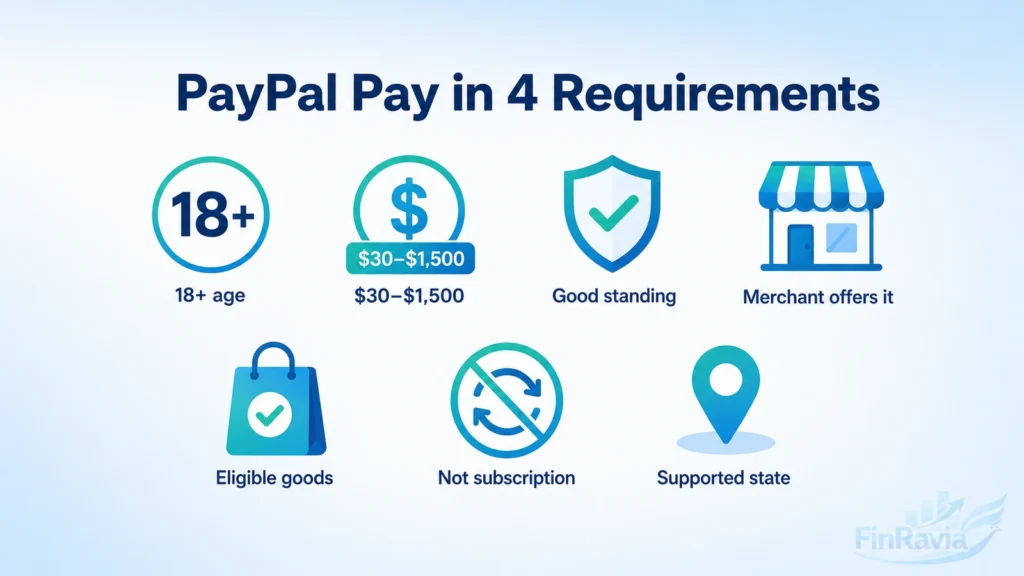
The PayPal account itself has to be in good standing, since a flagged, restricted or negative-balance account will not receive an offer regardless of the purchase amount.
Merchant and product restrictions sit on top of these account-level rules, and certain recurring subscription services are excluded even when the merchant otherwise supports Pay in 4. None of these conditions guarantee an offer on their own. They set the floor a checkout has to clear before PayPal even runs the transaction-level approval decision described later in this article.
| Condition | Requirement |
|---|---|
| Age | ✅ At least 18 years old |
| Location | ✅ Resident of a supported state |
| Cart value | ✅ Between $30 and $1,500 |
| Account status | ✅ PayPal account in good standing |
| Merchant | ✅ Merchant offers Pay in 4 at checkout |
| Product type | ✅ Goods or services are not excluded |
| Transaction type | ✅ Purchase is not a recurring subscription |
Main Reasons PayPal Pay in 4 Is Missing
Seven conditions decide whether Pay in 4 shows up at checkout, and any single one of them can block the option on its own, regardless of how the other six look.
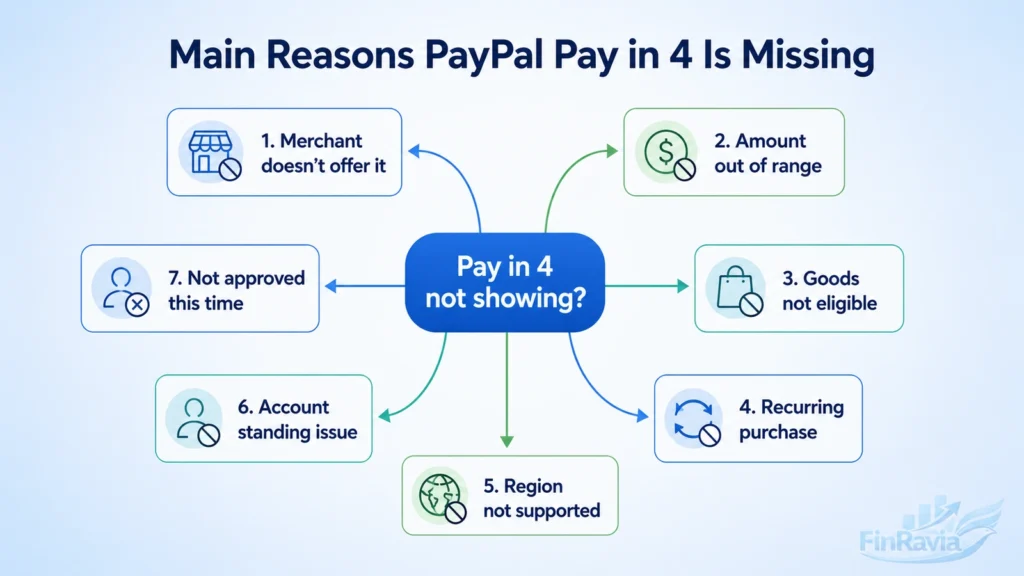
The Merchant Accepts PayPal but Does Not Offer Pay in 4
A merchant can accept PayPal at millions of stores and still leave Pay in 4 off the checkout screen, since the two are separate merchant decisions. “PayPal accepted” does not mean the Pay Later option is enabled.
There is no way to force Pay in 4 to appear if the merchant never enabled it. Pay in 4 not offered is confirmed by no “Pay in 4” label at checkout, not PayPal acceptance alone, and PayPal not offering Pay in 4 at one store says nothing about the next.
The same rule applies to any specific retailer a shopper asks about by name, such as Home Depot: PayPal acceptance at that store does not confirm Pay in 4 is offered there, and only the checkout page for that exact merchant can confirm it.
The Cart Amount Is Outside the $30–$1,500 Range
PayPal Pay in 4 only applies to purchases between $30 and $1,500, the eligible range for the installment option. A cart below $30 will not trigger the option, and a cart above $1,500 will not either, regardless of the shopper’s account history. Falling inside that range removes one blocker but does not approve the purchase by itself, since PayPal still evaluates the transaction separately.
| Cart total | Result |
|---|---|
| Below $30 | ❌ Not eligible for Pay in 4 |
| $30–$1,500 | ✅ Eligible amount, approval still required |
| Above $1,500 | ❌ Not eligible for Pay in 4 |
The Goods or Services in the Cart Are Not Eligible
Cart contents can block Pay in 4 even at an eligible merchant and an eligible dollar amount. Certain goods and services are excluded from the program, so eligible goods depend on category, and identical items in cart lists can produce a different result at different merchants.
Categories excluded from Pay in 4 include cigarettes and alcohol. The same merchant can show Pay in 4 for one cart while withholding it for another cart minutes later, since product eligibility is evaluated item by item, not merchant support alone.
| Merchant supports PayPal | Goods qualify | Pay in 4 result |
|---|---|---|
| ✅ Yes | ✅ Yes | ✅ Offer can appear |
| ✅ Yes | ❌ No | ❌ Offer withheld |
| ❌ No | — | ❌ Offer unavailable |
The Purchase Is Recurring or Subscription-Based
Recurring and subscription-based purchases sit outside Pay in 4 even when the merchant and cart amount look eligible. PayPal classifies the transaction type before presenting the option, and a purchase that renews automatically fails that classification regardless of price. This disqualifier operates independently of merchant support and cart value, so an eligible amount at an eligible merchant still will not produce an offer if the purchase auto-renews.
Region, State or Residence Does Not Qualify
Pay in 4 availability depends on the state of residence or country tied to the account. The option operates in the United States, Australia, France, the United Kingdom, Germany, Italy, Spain and Canada as supported countries, and residents outside those markets will not see it.
Missouri and Nevada are the two unsupported states, and Pay in 4 is not available to their residents. Shoppers there see the same checkout page as everyone else, with the option simply absent regardless of merchant or cart value.
Account Standing, Verification, Open Loans or Repayment History Blocks It
Account-level problems block Pay in 4 independently of the merchant, the cart or the amount. A negative balance, a policy violation, an active restriction or an open dispute can each remove the offer, since PayPal only extends Pay in 4 to an account in good standing.
PayPal also reviews how many Pay in 4 loans are open, and too many concurrent loans can prevent a new one even when every other condition is met. Verification status and repayment history sit alongside these factors, since an account that has not cleared identity verification for bank accounts, credit cards and loans faces the same outcome as a restricted account. None of these issues show up as a single error message, which is why checking account standing directly narrows the cause faster.
PayPal Did Not Approve This Specific Transaction
PayPal evaluates every Pay in 4 request as its own transaction-specific approval rather than a standing account privilege. The application draws on the applicant’s information, PayPal usage and history, credit history and, when needed, external bureau data, and a purchase that clears every condition can still be declined at this step.
Prior approvals carry no weight here, so a shopper approved last month is not approved in advance for the next purchase, and an application not approved on one order says nothing about the next. PayPal does not let a transaction through when risk signals fail, even when every listed condition looks satisfied, since the decision is made fresh, transaction by transaction, using whatever data PayPal has on file.
Spending Power, Preapproval and Soft Credit Check
Seeing a spending power figure on a PayPal account is not the same as approval. Spending power is a preapproval estimate of how much Pay in 4 activity the account could support, not a credit line and not a guarantee that any specific purchase will go through. The figure can shrink or disappear as PayPal reassesses the account, and not every customer sees one at all. An application still has to run through checkout and clear PayPal’s transaction-level approval regardless of what the estimate showed beforehand.
PayPal may run a soft credit check as part of that application, the same kind of check used to check loan eligibility before applying for other credit products. A soft credit check does not affect a credit score, which separates it from the hard inquiries tied to traditional credit card or loan applications. When PayPal needs more information, it can request access to up to two years of bank transaction history through Nova Credit, only after the applicant consents. This broader financial picture, combined with PayPal’s own usage data, produces the final approval or decline, not the spending power number shown before checkout.
🚫 Spending power is not a guarantee of Pay in 4 approval.
Why PayPal Pay in 4 Disappeared After It Worked Before
Pay in 4 disappearing after it worked once is a distinct pattern from Pay in 4 never showing up, because the account has already cleared eligibility and approval at least one time. Approval is tied to a specific shopping session, and switching payment methods mid-checkout, letting the session time out or hitting an internet glitch can each invalidate that approval on its own, independent of the account’s broader eligibility.
Some PayPal customers describe a specific sequence around a first Pay in 4 purchase. One account used Pay in 4 for the first time on a Best Buy order that included a 20 percent cashback promotion, not an instant discount, and the option disappeared the next day across other sites, including eBay. For some of these accounts, Pay in 4 returned after roughly 24 hours and worked again on a second Best Buy purchase, while other accounts reported the option staying unavailable for four days, close to a month, or several months running from as early as February.
In a separate account, a Nike checkout rejected a Pay in 4 application specifically because of unusual activity flags, even though the shopper described good or excellent credit and a single $100 purchase with no missed payments and $88 still outstanding on an existing balance, unrelated to a store card such as an RH card, which does not offer loans. PayPal support reviewed one of these accounts and reported no visible account issue, matching how the platform’s own process works, since decline reasons route to the PayPal Message Center rather than to a live support agent, and Customer Service cannot open or review a specific loan application.
This 24-hour return pattern and the account-specific outage lengths are reported by users, not confirmed by PayPal as a fixed rule, and should not be treated as a guaranteed timeline.
| Reported pattern | Example | What it suggests |
|---|---|---|
| Short outage | Option returns after about 24 hours | Temporary account-level review |
| Extended outage | Option stays unavailable for 4 days to several months | Longer review or unresolved flag |
| Cross-merchant absence | Option missing at more than one store at once | Account-level rather than merchant-level cause |
| Flagged decline | Application rejected for unusual activity | Fraud or risk review triggered |
PayPal Pay in 4 Not Working or Missing: What to Do
Working through Pay in 4’s eligibility conditions in order, rather than guessing at a single cause, is the fastest way to fix a PayPal Pay in 4 option missing at checkout or a PayPal Pay Later not working issue:
- Confirm the cart total falls between $30 and $1,500.
- Confirm the merchant shows a “Pay in 4” or “Pay Later” label at checkout, not just the PayPal button.
- Confirm the goods or services in the cart are not an excluded category.
- Confirm the purchase is a one-time charge, not a recurring subscription.
- Confirm the account’s state of residence is on PayPal’s supported list.
- Check the PayPal account for a negative balance, restriction or policy flag.
- Check for open disputes or an unusually high number of open Pay in 4 loans.
- Restart the checkout session and log back into the PayPal account.
- Relaunch the PayPal app if the option is missing only inside the app.
- Review the PayPal Message Center for a decline explanation.
- Contact PayPal Support directly if the cause is still unclear after these checks.
No setting inside the PayPal app fixes PayPal Pay in 4 not working with a single toggle, and account-specific investigations go through PayPal Support rather than a self-service switch. Some users report that removing PayPal as a saved payment method and re-adding it during checkout brought the option back when PayPal Pay Later not working affected only that one device, but this is a workaround reported by individual users rather than a documented fix, and it does not work for every account.
Terms, Fees, Activity and Currency Details to Know Before Applying
Every Pay in 4 loan comes with a loan agreement and disclosures that spell out the payment schedule, and that schedule is visible inside the PayPal app, on desktop, in the Pay Later section of the account, and in the confirmation email sent after checkout.
PayPal charges no sign-up fee, no application fee, no late fee and no NSF fee on a Pay in 4 loan itself, so Pay in 4 fees from PayPal are zero by design, though the bank or card issuer linked to the account can still charge its own NSF or overdraft fee if a scheduled repayment fails to clear. A purchase made in a currency other than U.S. dollars gets converted to USD by PayPal, and that conversion carries its own currency conversion charge separate from the loan.
Inside PayPal activity, a Pay in 4 purchase shows up as the full purchase amount listed under the merchant’s name, not as four separate line items, because PayPal pays the merchant the entire amount upfront and collects the four payments from the shopper afterward. The first payment, made at checkout, equals one-fourth of the total purchase price.
| Detail | Where it appears | Why it matters |
|---|---|---|
| Loan agreement | Pay Later section, confirmation email | States the binding repayment terms |
| Payment schedule | App, desktop, Pay Later section | Shows exact due dates for all four payments |
| PayPal fees | Not charged on Pay in 4 | No sign-up, application, late or NSF fee from PayPal |
| Bank/card fees | Charged by the financial institution | NSF or overdraft fee possible if a payment fails |
| Currency conversion | Applied automatically | Non-USD purchases convert to USD with a conversion charge |
Repayments Can Affect Future Pay Later Access
Pay in 4 repayments follow a fixed structure, the same automated logic behind how recurring payments work on any subscription or installment plan. The down payment comes out at checkout, and the three remaining repayments draft automatically every two weeks from whichever repayment method the shopper confirmed, whether that is a bank account, a debit card or an eligible credit card.
Not every card qualifies, the same way certain cards run into limits and declines on other online payments. Capital One and Chase credit cards specifically cannot be used to fund Pay in 4 repayments. A PayPal balance can cover a one-time repayment but cannot be set as the automatic funding source for the recurring charges.
Inside the Pay Later section, the account shows the remaining balance, the amount already paid, and a full plan activity log with the payment schedule. An extra payment toward the loan has to be submitted by 11:59 p.m. ET the day before the next due date to count against that installment, and PayPal refunds any overpayment within seven days without charging an early payoff penalty.
Once a repayment processes, it cannot be canceled or reversed. A failed repayment, caused by insufficient funds or an unconfirmed payment method, triggers an update to the account within 24 hours, and repayments cannot be paused, suspended or skipped once the loan terms are accepted.
Missed repayments carry consequences beyond the single loan. A missed payment can push that loan past due and can affect eligibility for future Pay Later offers, independent of every eligibility factor covered earlier in this article. Opening a dispute or expecting a refund does not pause repayments either, and a chargeback filed against a repayment itself can remove that payment from the loan and push the balance past due.
A merchant refund only reduces the Pay in 4 loan when PayPal can match it to that specific plan. Store credit, gift cards and cash refunds do not reduce the remaining loan balance, and a refund PayPal cannot identify against a specific plan gets deposited into the PayPal balance instead of applied to the loan.
| Repayment issue | What happens | Future eligibility risk |
|---|---|---|
| Missed repayment | Loan becomes past due | ⚠️ Can affect future Pay Later eligibility |
| Failed repayment | Insufficient funds or unconfirmed method | ⚠️ Account flagged for review |
| Dispute opened | Repayments continue as scheduled | ✅ No automatic pause |
| Chargeback on a repayment | Payment removed from the loan | ❌ Loan pushed past due |
Refunds interact with the loan differently depending on how the merchant issues them, which matters just as much as the repayment schedule itself:
| Refund scenario | Reduces the Pay in 4 loan |
|---|---|
| Merchant refund matched to the plan | ✅ Yes |
| Store credit | ❌ No |
| Gift card | ❌ No |
| Cash refund | ❌ No |
| Unidentified refund | ❌ No, credited to PayPal balance instead |
Frequently asked questions
Why is PayPal Pay in 4 not showing up at checkout?
Pay in 4 does not appear when the checkout fails to meet one of its conditions. The merchant may not offer it, the cart amount can sit outside $30 to $1,500, an item in the cart can be excluded, the purchase can be recurring, the account may not be in good standing, or PayPal may decline this specific application.
Why did my PayPal Pay in 4 disappear after I used it once?
PayPal Pay in 4 approval is evaluated per transaction rather than granted permanently, so it can disappear even after a first successful use. A different cart, a different merchant, a changed checkout session or a shift in account signals between two purchases can each produce a different outcome, even for a shopper who was approved before.
Can a store accept PayPal but not Pay in 4?
Yes. PayPal acceptance and Pay in 4 availability are two separate merchant settings, and a store can support standard PayPal checkout without ever enabling Pay in 4.
Why can't I use PayPal Pay in 4 anymore?
Check repayment history, open disputes, missed payments, the number of open Pay in 4 loans, overall account standing and verification status first, and review the PayPal Message Center for a specific decline explanation.
Does Pay in 4 spending power guarantee approval?
No. Spending power is an estimate of what the account could support, not a credit line and not a guarantee that a specific purchase will be approved.
Does a soft credit check affect my credit score?
No. PayPal states that a soft credit check may be used to evaluate a Pay in 4 application and that this check does not affect a credit score.
Can Pay in 4 disappear after a 24-hour period?
Some users regained the option after about 24 hours, while others reported it staying unavailable for four days, close to a month, or several months. This pattern is user-reported rather than a confirmed PayPal rule and should not be treated as a guaranteed timeline.
Do subscriptions qualify for PayPal Pay in 4?
Certain recurring or subscription-based services are excluded from Pay in 4, even at a merchant and cart amount that otherwise qualify.
Is there a PayPal app setting to turn Pay in 4 back on?
No dedicated toggle for Pay in 4 exists inside the PayPal app based on available troubleshooting reports. Relaunching the app, logging out and back in, and contacting PayPal Support or the Help Center are the available steps when the option is missing only in-app.
Should I keep paying if I opened a dispute or expect a refund?
Yes. Opening a dispute or expecting a refund does not automatically pause Pay in 4 repayments, and a refund only reduces the loan once PayPal can match it directly to that specific plan.
Why is my PayPal Pay in 4 not working, or why doesn't it show up at all?
PayPal Pay in 4 not working on one account traces back to eligibility failing at the merchant, cart or account level, and it doesn't show up at all when none of the checkout conditions in this article are met yet. Both point to the same set of causes, not a separate technical fault.
What does it mean if PayPal Pay in 4 didn't go through?
A Pay in 4 purchase that didn't go through was declined at the transaction-approval step covered earlier in this article, not blocked by a technical error, and the specific reason routes to the PayPal Message Center rather than a general decline message.
Can I use PayPal Pay in 4 in store?
No. Pay in 4 works only at online checkout. PayPal's in-store installment product is a separate offer called Pay Monthly, which carries interest and its own eligibility rules instead of the interest-free four-payment structure covered in this article.
Is PayPal Pay in 4 the same as PayPal Pay Monthly?
No. Pay in 4 and Pay Monthly are separate PayPal installment products with different schedules and eligibility rules, so PayPal Pay Monthly not showing up is a different issue with its own terms, not a variant of the Pay in 4 conditions covered in this article.
Can I use PayPal Pay in 4 for online casino deposits?
Gambling deposits sit outside Pay in 4's normal use case. PayPal blocks gambling transactions by default and only allows them through merchants it has individually approved, which limits real-money online casino deposits to a small number of regulated U.S. states. Even at an approved casino operator, using an installment product to fund a deposit adds a repayment obligation on top of whatever is lost or won, which is a different risk profile than a standard one-time payment.